

You can build an investor-ready data room in eight repeatable steps: request list first, then platform choice, folder tree, upload, permission groups, staged disclosure, managed Q&A, and a final audit before archiving. KPMG finds that a significant portion of dealmakers see due diligence as a structural challenge, which is exactly why a repeatable sequence beats improvising folders as requests roll in. Here's the checklist:
- Pull together the buyer or investor request list before touching any software.
- Choose a dedicated virtual data room (VDR) platform, not a shared drive.
- Build a numbered folder tree that mirrors the request list.
- Upload documents in bulk, applying protections at the workspace level.
- Set up permission groups (admin, advisor, external reviewer) before inviting anyone.
- Stage disclosure so sensitive materials open only at the right deal phase.
- Run a managed Q&A channel with a single answer of record.
- Audit activity logs, then archive the room once the deal closes.
Key Takeaways
A data room setup succeeds when the request list drives the folder structure, permissions are staged by group, and one owner is accountable for every top-level folder.
| Point | Details |
|---|---|
| Start with the request list | Build your folder tree from actual buyer or investor requests, not a generic template. |
| Keep folders shallow and numbered | Use roughly 12 numbered top-level folders, three levels deep at most, for fast navigation. |
| Assign one owner per folder | Accountability prevents stale documents and duplicate uploads during active diligence. |
| Stage access by group | Promote entire bidder or investor rounds through group permissions instead of folder-by-folder changes. |
| Use Brightcapital's integrated workspace | Combine secure document storage with investor matching and cap table tools in one workflow. |
Table of Contents
- What Is a Data Room Setup and When Do You Need One?
- How Do You Plan the Scope, Owners, and Timeline?
- How Do You Choose the Right VDR Provider?
- What Folder Structure and Naming Convention Should You Use?
- What Documents Belong in a Data Room Checklist?
- How Should You Structure Access Permissions and Disclosure?
- What Security Controls Does an Investor-Facing Room Need?
- How Do You Prepare Files Before Upload?
- How Do You Maintain and Close the Room After the Deal?
- What Workflow Does Brightcapital Recommend for Founders?
- Coordinating With Internal Teams and External Advisors
- Get a Secure Room Built Into Your Fundraising Workflow
- Frequently Asked Questions
- Sources
What Is a Data Room Setup and When Do You Need One?
A data room setup is the process of organizing and securing every document a buyer, investor, or auditor will need to evaluate your company, structured for fast, controlled review rather than a document dump. You need one for sell-side M&A, fundraising rounds from seed through Series B and beyond, IPO preparation, financial audits, and any formal buyer or investor diligence process.
Timing matters more than most founders expect. For a fundraising round, start building the room one to four weeks before you begin outreach to investors. Document-heavy transactions, like an acquisition or a full audit, often need two to four weeks of prep work before the first external reviewer logs in.
A room is ready to launch when it hits three marks:
- Every folder is searchable and mapped to a named owner.
- Access is staged so reviewers see only what's appropriate for their round.
- A working Q&A process is in place before you send the first invite.
How Do You Plan the Scope, Owners, and Timeline?
Planning takes a short kickoff meeting, not a committee. Start by defining scope: which document categories will actually appear in the room, typically financials, legal, IP, HR, product, and market research.
Next, map your audiences. Most rooms need three to five default access groups: internal admins, advisors and legal counsel, early reviewers, and exclusive bidders or lead investors. Dataroom recommends creating these access groups before a single file gets uploaded, since retrofitting permissions after documents are live invites mistakes.
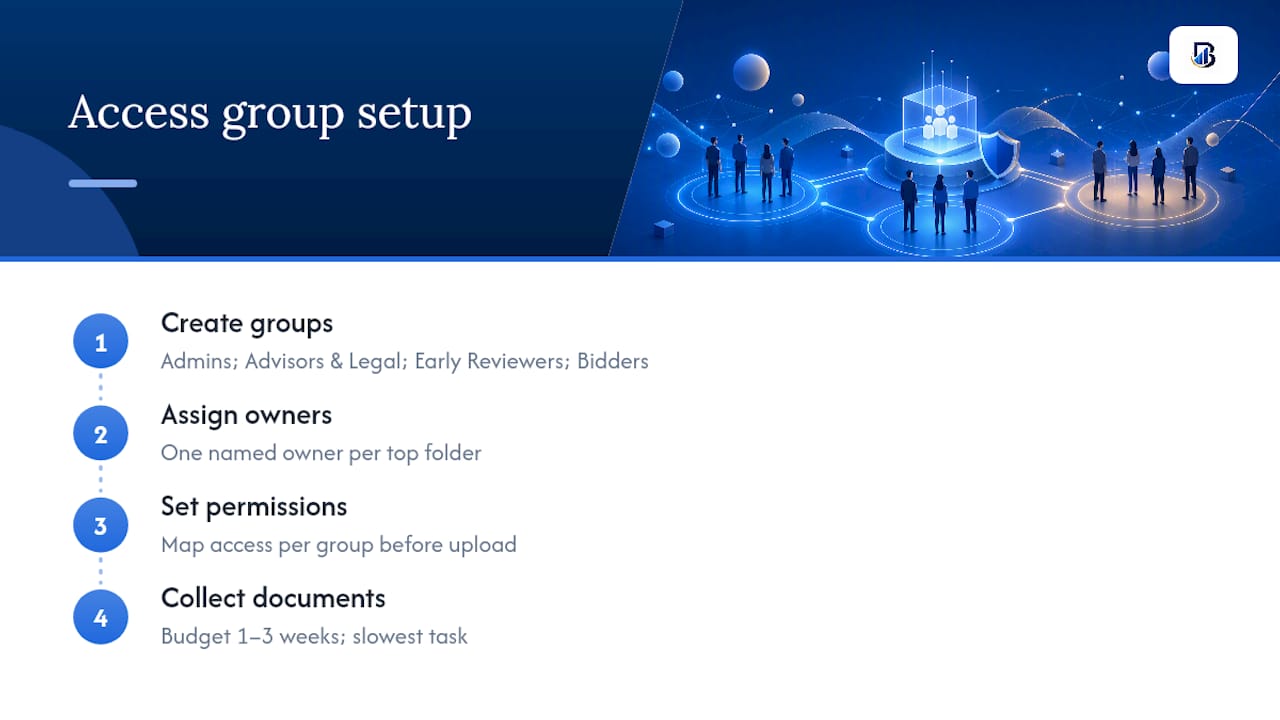
Assign one named owner per top-level folder. Someone has to be accountable when a document goes stale or a reviewer flags a gap. Budget one to three weeks to actually collect the documents. That's almost always the slowest part of the entire setup, not the software configuration.
How Do You Choose the Right VDR Provider?
The provider decision comes down to features and pricing structure, and the two interact more than most founders realize. LegalClarity notes that dedicated VDR platforms include deal-centric features, granular permissions, watermarking, Q&A modules, audit trails, and AES-256 encryption, while generic cloud drives like a shared Google Drive folder simply weren't built for formal diligence.
Look for these features before signing anything:
- Granular permissions and group-based access controls
- Dynamic watermarking and digital rights management (DRM)
- Detailed audit logs with exportable analytics
- A built-in Q&A module tied to document references
- Bulk upload with automatic indexing and OCR
- Redaction tools for PII and trade secrets
- Mandatory multi-factor authentication (MFA) and AES-256 encryption
- Single sign-on (SSO) support
- Export and archival tools for post-close record-keeping
Pricing shapes vary widely. Some providers charge per user, others per gigabyte stored, and some quote flat-fee project pricing that covers the whole deal lifecycle. Watch for setup fees, overage charges once you exceed a storage tier, and long-term archival costs that only show up after the deal closes.
Pro Tip: If fundraising speed is your priority, weight your decision toward easy onboarding and a smooth Q&A workflow. If you're running a competitive M&A process with multiple bidders, weight it toward analytics and bidder segmentation instead.
What Folder Structure and Naming Convention Should You Use?
Reviewers should find any document within about 90 seconds, and that only happens with a shallow, numbered hierarchy. LockRoom's sell-side template uses 12 numbered top-level folders that map directly to what buyers ask for:
- 01 Corporate
- 02 Financials
- 03 Legal
- 04 Customers
- 05 Suppliers
- 06 HR
- 07 Operations
- 08 IP
- 09 Real Estate
- 10 Tax
- 11 Compliance
- 12 Insurance
Keep the hierarchy to about three levels deep. Numbering the top tier keeps the order stable no matter how a given platform's default sorting behaves.
For file names, pick one convention and enforce it everywhere: YYYY-MM-DD_document-type_v# works well, as does a category-based format like Category.DocType.Period.V#. Add a short "ReadMe" file at the root explaining the structure, the update cadence, and who owns each section.
What Documents Belong in a Data Room Checklist?
An investor-ready checklist covers five categories, and buyers notice fast when one is thin.
Financials: audited statements where available, three to five years of P&L and balance sheets, a current cap table, forward-looking forecasts, unit economics, and recent bank statements. Audited statements and cap tables are must-haves; older bank statements are often optional depending on deal stage.
Legal and corporate: entity formation documents, shareholder agreements, material contracts, IP assignment agreements, litigation summaries, and any relevant regulatory filings.
Commercial and product: signed customer contracts, profiles of your largest accounts, core KPIs, a product road map, and supporting market research.
HR and compliance: employee agreements, the option plan, benefits summaries, and background-check policies, redacting personally identifiable information where it's not legally required.
IP and technical: patent filings, source code ownership statements, architecture diagrams, and any security certifications your company holds.
How Should You Structure Access Permissions and Disclosure?
Four permission tiers cover almost every deal: admins with full control, internal editors, advisors and legal counsel with limited view-and-download rights, and external reviewers who typically get view-only access, with download granted by exception.
Build these as group-based permissions rather than folder-by-folder settings. When you're ready to open the room to a full round of bidders, you promote the entire group at once instead of touching dozens of individual folders.
Operationally, a few controls matter more than the rest:
- Invite reviewers in waves rather than all at once.
- Require NDA acceptance at login before any document loads.
- Set expiry dates on access so stale invitations don't linger.
- Keep a documented bulk-revoke process ready for closing day.
- Export a full access audit both before opening the room and after closing it.
Caplinked's staged disclosure model pairs this permission structure with a Q&A workflow that keeps one answer of record, which cuts down on duplicate questions arriving through side channels.
What Security Controls Does an Investor-Facing Room Need?
Baseline security isn't optional for a fundraising room: AES-256 encryption in transit and at rest, mandatory MFA for every external user, NDA acceptance built into the login flow, and session timeouts at the platform level.
Leak prevention goes a step further. Dynamic watermarking that stamps viewer metadata onto every page discourages screenshots and leaks, and most serious platforms also support download and print restrictions plus selective redaction for PII and trade secrets.

Pro Tip: Run your redaction pass before you upload, not after. Fixing an exposed Social Security number in a document that's already been viewed by three reviewers is a much bigger headache than catching it beforehand.
Monitoring closes the loop. Review engagement weekly, keep activity logs on who read what and when, and export the audit trail so you have a permanent record after the deal closes, since dealmakers cite due diligence complexity as a top structural friction point and a clean log is your best defense if a dispute ever surfaces.
How Do You Prepare Files Before Upload?
Convert everything to PDF for final documents, run OCR on any scanned files, and strip unnecessary metadata before it goes live. Enforce one rule: only the current version of a file exists in the room at any time.
Build the complete folder tree first, then bulk upload into it. Applying protections at the workspace level before upload means every file inherits encryption, watermarking, and access rules automatically, rather than requiring per-file configuration later.
Before you invite a single external reviewer, run this pre-launch test:
- Log in as a non-admin user and confirm the experience matches what reviewers will see.
- Verify the watermark actually renders on downloaded files.
- Double-check that permission groups show the correct folders.
- Submit a sample Q&A question and confirm the routing works.
- Confirm the audit log captured every test action.
How Do You Maintain and Close the Room After the Deal?
A data room isn't a set-and-forget project. It needs a weekly rhythm and a clean shutdown once the deal is done.
- Review new uploads, unanswered Q&A items, and any stale drafts every week during active diligence.
- Notify active reviewers when significant new files land so nothing gets missed.
- Revoke all external access the moment the deal closes.
- Export the full audit trail and the complete Q&A log for your legal record.
- Produce an archived master copy and retain it for whatever period your legal counsel recommends.
Most platforms offer reduced-rate archival storage for closed rooms, which is worth using instead of downloading everything to a local drive and hoping it stays organized.
What Workflow Does Brightcapital Recommend for Founders?
Brightcapital's recommended sequence mirrors the workflow throughout this guide: request-list-first kickoff, a template folder tree, named owners per section, staged disclosure groups, a managed Q&A process, and a final audit-and-archive step. It's a template you can hand directly to a Brightcapital consultant or a virtual assistant and expect it to run without much back-and-forth.
Founders who follow this sequence typically see a faster reviewer experience, fewer repeated Q&A cycles, and cleaner engagement analytics once investors start browsing the room. It also leaves you with simpler records after close, since everything sits inside one secure workspace instead of scattered across email threads and shared drives. Brightcapital's Funding Academy and its resources on launching a private capital raise walk through the same sequence in more depth if you want to put it into practice.
Coordinating With Internal Teams and External Advisors
A data room fails or succeeds on coordination, not just folder architecture. The founder who tries to own every document personally almost always becomes the bottleneck, especially once external counsel and finance advisors start requesting changes in parallel.
Assign a single internal point of contact, usually the founder or a deal lead, to own the room's overall structure and timeline. That person doesn't have to gather every document themselves, but they need final say on what goes where and when a folder is considered complete.
Bring in your legal counsel early, ideally during the planning phase, not after documents are already uploaded. Advisors typically need to review material contracts, IP assignments, and cap table documents before those files go live to any external reviewer, and catching an issue before upload is far cheaper than redacting it after three people have already viewed it. If your company hasn't formalized its legal document set, reviewing your governance and contract documentation before the room opens saves a round of frantic edits mid-diligence.
Set a standing weekly check-in between the internal owner, legal counsel, and your finance lead for as long as the room stays active. Fifteen minutes is usually enough to flag stale folders, unanswered Q&A items, and any document that needs a version update. This small habit is what actually keeps a data room from decaying into the same disorganized mess it was built to prevent.
A Founder's Note on What Actually Compressed Our Timeline
A tight folder structure and one Q&A channel, not extra software, cut our diligence cycle nearly in half. Bright Capital America deal team.
Get a Secure Room Built Into Your Fundraising Workflow
A dedicated fundraising platform means you're not stitching together a folder tool, a cap table spreadsheet, and an investor CRM just to get through one round. Brightcapital's secure data rooms come built into the same workspace as investor matching and cap table management, so the documents you organize here connect directly to the 27,000-plus verified investor profiles on the platform without exporting anything to a separate system.
The workspace includes granular permission groups, activity tracking, and document storage designed around fundraising timelines rather than generic file sharing. If you're preparing to raise, you can start building your round inside Brightcapital's private capital raise infrastructure and connect your data room directly to investor outreach from day one. Founders who want to browse potential investors first can also start with the investor database to shape their target list before the room even opens.
Frequently Asked Questions
How long does a data room setup usually take? Fundraising rounds typically need one to four weeks of prep before outreach begins. Document-heavy deals like acquisitions or audits often run two to four weeks, since gathering documents is slower than configuring the platform itself.
What's the difference between a data room and a shared drive? A dedicated data room includes granular permissions, watermarking, audit logs, and a built-in Q&A module, features a generic shared drive like Google Drive or SharePoint simply doesn't offer for formal diligence.
How many folders should a startup data room have? Keep the top level to roughly 12 numbered folders, mapped to categories like corporate, financials, legal, and IP, with no more than three levels of depth underneath.
Who should have admin access to the data room? Limit full admin rights to a small internal group, typically the founder or deal lead and one finance or legal counterpart. Everyone else should sit in a narrower permission tier based on their role in the deal.
Do I need a data room for an early seed round? Not always. A lightweight secure folder with basic access control can work for early conversations, but once you're sharing financials, cap tables, and legal documents with multiple investors, a dedicated data room setup keeps everything auditable.
What happens to the data room after the deal closes? Revoke external access immediately, export the full audit trail and Q&A log, and archive a master copy for the retention period your legal counsel recommends.
Sources
- How to Set Up a Due Diligence Virtual Data Room in 7 Steps
- How to Create a Data Room: Structure and Security - LegalClarity
- Dataroom
- Sell Side Data Room Folder Structure: The 12 Folder M&A Template (2026) | LockRoom